AWS tagging best practices – 5 things to know

I read AWS tagging best practices whitepaper which was published in December 2018 and distilled 5 takeaways.

1. Use cases – tags have several use-cases including:

  • Cost allocation – using AWS Cost Explorer you can break down AWS costs by tag
  • Access Control – AM policies support tag-based conditions
  • Automation – for example tags can be used to opt into or out of automated task
  • AWS Console Organization and Resource Groups – e.g. create a custom console that organizes and consolidates AWS resources based on one or more tags
  • Security Risk Management – use tags to identify resources that require heightened security risk management practices
  • Operations Support – I find this use case tightly related to the automation use case

2. Standardized tag names and tag values

There are only two hard things in Computer Science: cache invalidation and naming things.

Phil Karlton (check here)

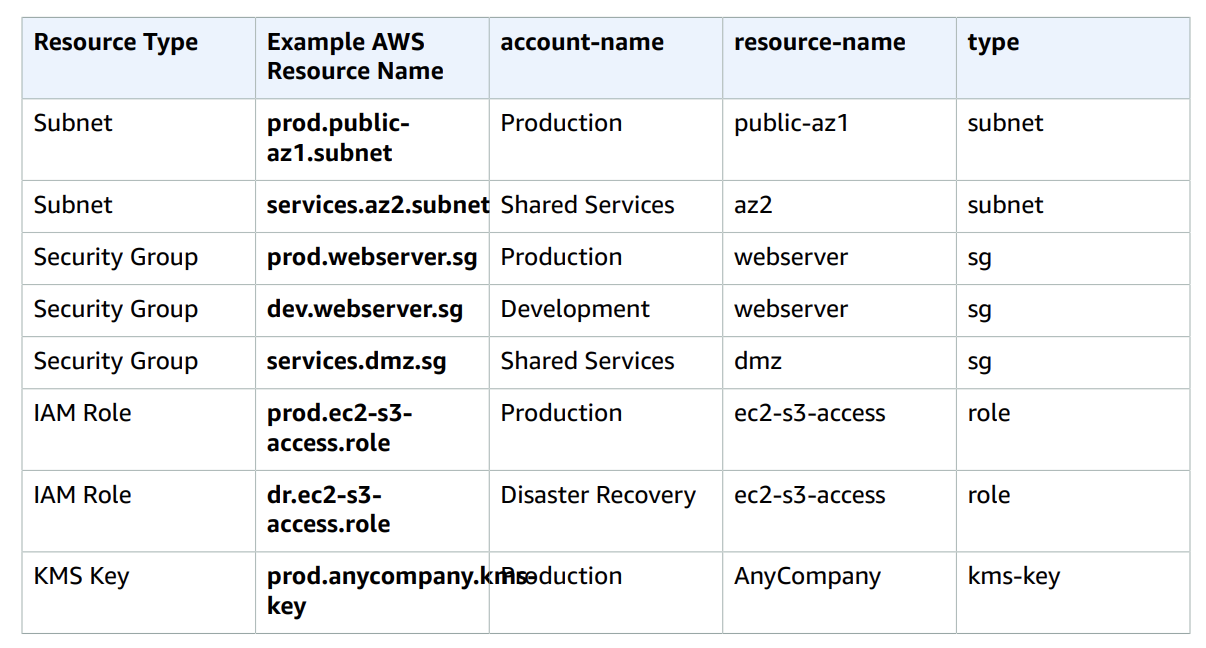
A good practice as suggested in the whitepaper is to gather tagging requirements from all stakeholders and only then start implementing but a minimal step can be to define a convention for tags names and values that everyone can follow, see example from the document below.

tag names example


3. Cost allocation tags delay – this is something I experienced personally – “Cost allocation tags appear in your billing data only after you have (1) specified them in the Billing and Cost Management Console and (2) tagged resources with them”. And even then it can take around 24 hours to appear, take it into account.


4. Tag everything – sounds trivial but sometimes organizations tag only some of the resources, tag everything you can to get a more comprehensive and accurate data of your expenses. A nice feature in the Billing and Cost Management Console is the ability to find resources the don’t have a specific tags so you can easily find out what you missed.


5. Tags limitations – until 2016 AWS allowed up to 10 tags for a given resource. The current limit is 50. It definitely allows much more but it is still a limit to bear in mind when creating a tagging strategy. One way to avoid it is by using compound values, e.g. “anycompany:technical-contact = Susan Jones;sue.jones@anycompany.com; +12015551213” rather than a tag for each attribute (e.g. “anycompany:technical-contact-name = Susan Jones”).

5 interesting things – AWS edition (18/06/21)

As I collect items for my posts and wait until I have time to write about them I noticed I have many items related to AWS and decided to have a special edition.


12 Common Misconceptions about DynamoDB – many times our beliefs about certain tools or technology are based on hearing more than doing or doing but not getting into the depth of things and when running into a problem solving it with a solution we already know. This post describes features and qualities of DynamoDB that are sometimes ignored.

https://dynobase.dev/dynamodb-11-common-misconceptions/

Related Bonus – I really liked the link to Alex DeBrie post about single table design with DynamoDB

https://www.alexdebrie.com/posts/dynamodb-single-table/

AWS Chalice – it is not an official offering but rather a python code package for writing serverless applications. The syntax is very similar to Flask while there is a native support for local testing, AWS SAM and Terraform integration, etc. Disclaimer – if you are on multi-cloud I would not move from Flask or FastAPI to Chalice. Also note the used services (AWS lambda, AWS API Gateway, etc.) limits and make sure they don’t limit your app.

https://aws.github.io/chalice/index

Related Bonus – auth0 tutorial on How to Create CRUD REST API with AWS Chalice
https://auth0.com/blog/how-to-create-crud-rest-api-with-aws-chalice/


ElectricEye – “ElectricEye is a set of Python scripts (affectionately called Auditors) that continuously monitor your AWS infrastructure looking for configurations related to confidentiality, integrity and availability that do not align with AWS best practices.”. It is hard to know and follow all AWS best practices and this bundle of scripts is supposed to help uncover those. I have not tried it myself yet but it seems promising.
https://github.com/jonrau1/ElectricEye


My Comprehensive Guide to AWS Cost Control – computing and cloud costs take a big portion of every tech organization those days. Being a more valuable team member also means being aware of the costs and choosing wisely between the different alternatives.

https://corey.tech/aws-cost/


The Best Way To Browse 6K+ Quality AWS GitHub Repositories – most of the time we are not inventing the wheel and someone probably already did something very similar to what we are doing. Let’s browse github to find it and accelerate our process.

https://app.polymersearch.com/discover/aws

Bonus – AWS snowball – I found out that this service exists only this week and it blew my mind – https://aws.amazon.com/snowball/

Running my first EMR – lessons learned

Today I was trying to run my first EMR, here are few lessons I learned during this day. I have previously run hadoop streaming mapreduce so I was familiar with the mapreduce state of mind. However, I was not familiar with the EMR environment.

I used boto – Amazon official python interface.

1. AMI version – default AMI version is 1.0.0 – first release. This means the following specifications –

Operating system: Debian 5.0 (Lenny)

Applications: Hadoop 0.20 and 0.18 (default); Hive 0.5, 0.7 (default), 0.7.1; Pig 0.3 (on Hadoop 0.18), 0.6 (on Hadoop 0.20)

Languages: Perl 5.10.0, PHP 5.2.6, Python 2.5.2, R 2.7.1, Ruby 1.8.7

File system: ext3 for root and ephemeral

Kernel: Red Hat

For me Python 2.5.2 means –
  • Does not include json – new in version 2.6.
  • collections is new in python 2.4, but not all the models were added in this version –
namedtuple() factory function for creating tuple subclasses with named fields

New in version 2.6.

deque list-like container with fast appends and pops on either end

New in version 2.4.

Counter dict subclass for counting hashable objects

New in version 2.7.

OrderedDict dict subclass that remembers the order entries were added

New in version 2.7.

defaultdict dict subclass that calls a factory function to supply missing values

New in version 2.5.

 
Therefore specifying the ami_version version can be critical. Version 2.2.0 worked fine for me.
2. Must process all the input!
Naturally we will want to process all the input. However, for testing I went over only the n-first lines and then added a break to make things run faster. I was not consuming all the lines and therefore got an error. More about it here –
3. Output folder must not exists. This is the same as in hadoop streaming map reduce, for me the way to avoid it was to add a timestamp –

output="s3n://<my-bucket>/output/"+str(int(time.time()))

4. Why my process failed – one option which produces are relatively understandable explanation is  – conn.describe_jobflow(jobid).laststatechangereason

5. cache_files – enables you to import files you need for the map reduce process. Super important to “specify a fragment”, i.e. specify the local file name

cache_files=['s3n://<file-location>/<file-name>#<local-file-name>']
Otherwise you will obtain the following error –
“Streaming cacheFile and cacheArchive must specify a fragment”
6. Status – the are 7 different status your flow may have – COMPLETED, FAILED, TERMINATED, RUNNING, SHUTTING_DOWN, STARTING and WAITING. The right order of statuses if everything goes well is STARTING -> RUNNING ->SHUTTING_DOWN -> COMPLETED.
The SHUTTING_DOWN may take a while even for a very simple flow I measured about 1 minute of SHUTTING_DOWN process.
Resources I used –

http://boto.readthedocs.org/en/latest/emr_tut.html