Better Plotly Bar Chart

I’m reading “storytelling with data” by Cole Nussbaumer Knaflic. I plan to write my thoughts and insights from the book once I finish it. For now, I wanted to play with it a bit and create a better bar chart visualization that –

  1. Highlight the category you find most important and assign a special color to it (i.e prominent_color in the code), while the remaining categories used the same color (i.e. latent_color)
  2. Remove grids and make the background and paper colors the same to remove cognitive load.

The implementation is flexible, so if you feel like changing one of the settings(i.e., show the grid lines or center the title) you can pass it via keyword arguments when calling the function.


from typing import Any
import pandas as pd
import plotly.graph_objects as go
import pandas as pd
def barchart(
df: pd.DataFrame, x_col: str, y_col: str,
title: str | None = None,
latent_color : str = 'gray',
prominent_color: str = 'orange',
prominent_value: Any | None = None,
**kwargs: dict,
) -> go.Figure:
"""_summary_
Args:
df (pd.DataFrame): Dataframe to plot
x_col (str): Name of x coloumn
y_col (str): Name of y coloumn
title (str | None, optional): Chart title. Defaults to None.
latent_color (str, optional): Color to use for the values we don't want to highlight. Defaults to 'gray'.
prominent_color (str, optional): Color to use for the value we want to highlight. Defaults to 'orange'.
prominent_value (Any | None, optional): Value of the category we want to highlight. Defaults to None.
Returns:
go.Figure: Plotly figure object
"""
colors = (df[x_col] == prominent_value).replace(False, latent_color).replace(True, prominent_color).to_list()
fig = go.Figure(data=[
go.Bar(
x=df[x_col],
y=df[y_col],
marker_color=colors
)],
layout=go.Layout(
title=title,
xaxis=dict(title=x_col, showgrid=False),
yaxis=dict(title=y_col, showgrid=False),
plot_bgcolor='white',
paper_bgcolor='white'
)
)
fig.update_layout(**kwargs)
return fig
if __name__ == "__main__":
data = {'categories': ['A', 'B', 'C', 'D', 'E'],
'values': [23, 45, 56, 78, 90]}
df = pd.DataFrame(data)
fig = barchart(df, 'categories', 'values', prominent_value='C', title='My Chart', yaxis_showgrid=True)
fig.show()

5 interesting things (25/04/2023)

Load balancing – excellent explanations and visualizations about load balancing and different approaches. I wish for follow-up posts about caching and stickiness that influence performance and practical setups – how to set loaded balancers in AWS under those considerations.

https://samwho.dev/load-balancing/

visitdata  – A terminal interface for exploring and arranging tabular data. I played with this tool a bit, it is very promising and, at the same time, has a stiff learning curve (think vi) that might keep people away.

https://www.visidata.org/

Software accessibility for users with Attention Deficit Disorder (ADHD) – software accessibility is a topic that I always try to keep in mind. The usual software accessibility patterns refer to visual impairment, e.g., color contrast, font size, etc. This post tackles the accessibility topic from the prism users with ADHD, and I find it groundbreaking. I find that the suggested patterns (e.g., recently opened subscription reminders, etc.) are primarily suitable UX for all users, not just those with ADHD.

https://uxdesign.cc/software-accessibility-for-users-with-attention-deficit-disorder-adhd-f32226e6037c

Minimum Viable Process – I liked the post very much and the following point was the one I relate the most to – Minimum Viable Process process is iterative – processes and procedures must be constantly refined. Processes should evolve along with the company and serve the company rather then the company serve the process.

https://mollyg.substack.com/p/minimum-viable-process

Interactive Calendar Heatmaps with Python — The Easiest Way You’ll Find – always wanted to create a GitHub-like activity visualization? Great, use plotly-calplot for that. See the example here – 

https://python.plainenglish.io/interactive-calendar-heatmaps-with-plotly-the-easieast-way-youll-find-5fc322125db7

Exploratory Data Analysis Course – Draft

Last week I gave an extended version of my talk about box plots in Noa Cohen‘s Introduction to Data Science class at Azrieli College of Engineering Jerusalem. Slides can be found here.

The students are 3rd and 4th-year students, and some will become data scientists and analysts. Their questions and comments and my experience with junior data analysts made me understand that a big gap they have in purchasing those positions and performing well is doing EDA – exploratory data analysis. This reminded me of the missing semester of your CS education – skills that are needed and sometimes perceived as common knowledge in the industry but are not taught or talked about in academia. 

“Exploratory Data Analysis (EDA) is the crucial process of using summary statistics and graphical representations to perform preliminary investigations on data in order to uncover patterns, detect anomalies, test hypotheses, and verify assumptions.” (see more here). EDA plays an important role in everyday life of anyone working with data – data scientists, analysts, and data engineers. It is often also relevant for managers and developers to solve the issues they face better and more efficiently and to communicate their work and findings.

I started rolling in my head how would a EDA course would look like –

Module 1 – Back to basics (3 weeks)

  1. Data types of variables, types of data
  2. Basic statistics and probability, correlation
  3. Anscombe’s quartet
  4. Hands on lab – Python basics (pandas, numpy, etc.)

Module 2 – Data visualization (3 weeks)

  1. Basic data visualizations and when to use them – pie chart, bar charts, etc.
  2. Theory of graphical representation (e.g Grammar of graphics or something more up-to-date about human perception)
  3. Beautiful lies – graphical caveats (e.g. box plot)
  4. Hands-on lab – python data visualization packages (matplotlib, plotly, etc.).

Module 3 – Working with non-tabular data (4 weeks)

  1. Data exploration on textual data
  2. Time series – anomaly detection
  3. Data exploration on images

Module 4 – Missing data (2 weeks)

  1. Missing data patterns
  2. Imputations
  • Hands-on lab – a combination of missing data \ non-tabular data

Extras if time allows-

  1. Working with unbalanced data
  2. Algorithmic fairness and biases
  3. Data exploration on graph data

I’m very open to exploring and discussing this topic more. Feel free to reach out – twitterLinkedIn

CSV to radar plot

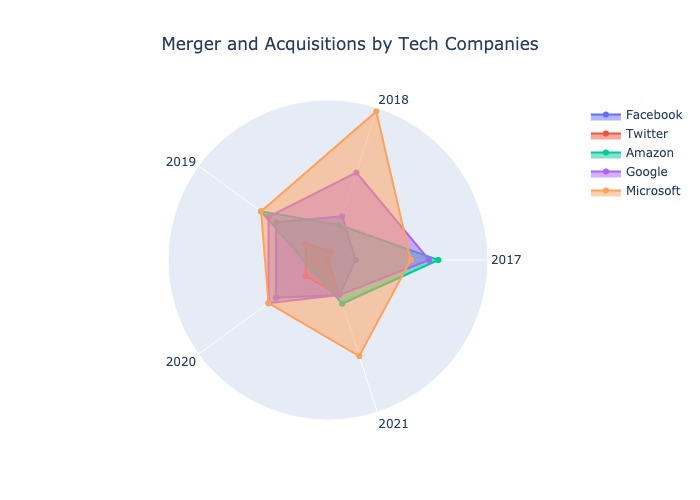
I find a radar plot a helpful tool for visual comparison between items when there are multiple axes. It helps me sort out my thoughts. Therefore I created a small script that helps me turn CSV to a radar plot. See the gist below, and read more about the usage of radar plots here.

So how does it works? you provide a csv file where the columns are the different properties and each record (i.e line) is a different item you want to create a scatter for.

The following figure was obtained based on this csv –

https://gist.github.com/tomron/e5069b63411319cdf5955f530209524a#file-examples-csv

The data in the file is based on – https://www.kaggle.com/datasets/shivamb/company-acquisitions-7-top-companies

And I used the following command –

python csv_to_radar.py examples.csv --fill toself --show_legend --title "Merger and Acquisitions by Tech Companies" --output_file merger.jpeg
Radar plot
import plotly.graph_objects as go
import plotly.offline as pyo
import pandas as pd
import argparse
import sys
def parse_arguments(args):
parser = argparse.ArgumentParser(description='Parse CSV to radar plot')
parser.add_argument('input_file', type=argparse.FileType('r'),
help='Data File')
parser.add_argument(
'–fill', default=None, choices=['toself', 'tonext', None])
parser.add_argument('–title', default=None)
parser.add_argument('–output_file', default=None)
parser.add_argument('–show_legend', action='store_true')
parser.add_argument('–show_radialaxis', action='store_true')
return parser.parse_args(args)
def main(args):
opt = parse_arguments(args)
df = pd.read_csv(opt.input_file, index_col=0)
categories = df.columns
data = [go.Scatterpolar(
r=[*row.values, row.values[0]],
theta=categories,
fill=opt.fill,
name=label) for label, row in df.iterrows()]
fig = go.Figure(
data=data,
layout=go.Layout(
title=go.layout.Title(text=opt.title, xanchor='center', x=0.5),
polar={'radialaxis': {'visible': opt.show_radialaxis}},
showlegend=opt.show_legend
)
)
if opt.output_file:
fig.write_image(opt.output_file)
else:
pyo.plot(fig)
if __name__ == "__main__":
main(sys.argv[1:])
view raw csv_to_radar.py hosted with ❤ by GitHub
Parent Company 2017 2018 2019 2020 2021
Facebook 3.0 5.0 7.0 7.0 4.0
Twitter 0.0 1.0 3.0 3.0 4.0
Amazon 12.0 4.0 9.0 2.0 5.0
Google 11.0 10.0 8.0 8.0 4.0
Microsoft 9.0 17.0 9.0 8.0 11.0
view raw examples.csv hosted with ❤ by GitHub
numpy==1.22.4
pandas==1.4.2
plotly==5.8.0
python-dateutil==2.8.2
pytz==2022.1
six==1.16.0
tenacity==8.0.1

Other pie chart

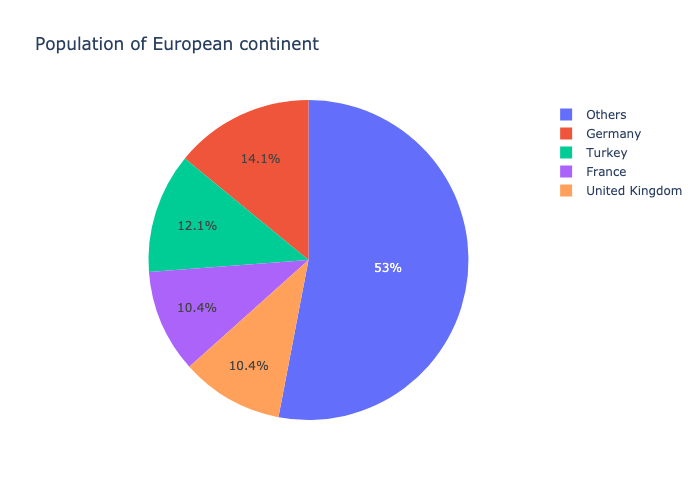
This morning I read “20 ideas for better data visualization“. I liked it very much and specially I found 8th idea – “Limit the number of slices displayed in a pie chart” very relevant for me. So I jumped into the plotly express code and created a figure of type other_pie which given a number (n) and a label (other_label) created a pie chart with n sectors. n-1 of those sectors are the top values according to the `values` column and the other section is the sum of the other rows.

A gist of the code can be found here (check here how to build plotly)

I used the following code to generate standard pie chart and pie chart with 5 sectors –

import plotly.express as px
df = px.data.gapminder().query("year == 2007").query("continent == 'Europe'")
df.loc[df['pop'] < 2.e6, 'country'] = 'Other countries' # Represent only large countries
pie_fig = px.pie(df, values='pop', names='country', title='Population of European continent')
otherpie_fig = px.other_pie(df, values='pop', names='country', title='Population of European continent', n=5, other_label="others")

And this is how it looks like –

Pie chart
Pie chart
Other pie chart

5 tips for using Pandas

Recently, I worked closely with Pandas and found out a few things that are might common knowledge but were new to me and helped me write more efficient code in less time.


1. Don’t drop the na

Count the number of unique values including Na values.

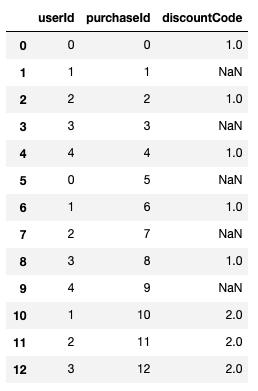
Consider the following pandas DataFrame –

df = pd.DataFrame({"userId": list(range(5))*2 +[1, 2, 3],
                   "purchaseId": range(13),
                   "discountCode": [1, None]*5 + [2, 2, 2]})

Result

If I want to count the discount codes by type I might use –  df['discountCode'].value_counts() which yields – 

1.0    5
2.0    3

This will miss the purchases without discount codes. If I also care about those, I should do –

df['discountCode'].value_counts(dropna=False)

which yields –

NaN    5
1.0    5
2.0    3

This is also relevant for nuniqiue. For example, if I want to count the number of unique discount codes a user used – df.groupby("userId").agg(count=("discountCode", lambda x: x.nunique(dropna=False)))

See more here – https://pandas.pydata.org/pandas-docs/stable/reference/api/pandas.DataFrame.nunique.html

2. Margin on Row \ columns  only

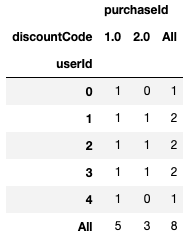
 Following the above example, assume you want to know for each discount code which users used it and for each user which discount code she used. Additionally you want to know has many unique discount codes each user used and how many unique users used each code, you can use pivot table with margins argument –

df.pivot_table(index="userId", columns="discountCode",
               aggfunc="nunique", fill_value=0,
               margins=True)

Result –

It would be nice to have the option to get margins only for rows or only for columns. The dropna option does not act as expected – the na values are taken into account in the aggregation function but not added as a column or an index in the resulted Dataframe.

3. plotly backend


Pandas plotting capabilities is nice but you can go one step further and use plotly very easy by setting plotly as pandas plotting backend.  Just add the following line after importing pandas (no need to import plotly, you do need to install it) –

pd.options.plotting.backend = "plotly"

Note that plotly still don’t support all pandas plotting options (e.g subplots, hexbins) but I believe it will improve in the future. 


See more here – https://plotly.com/python/pandas-backend/


4. Categorical dtype and qcut

Categorical variables are common – e.g., gender, race, part of day, etc. They can be ordered (e.g part of day) or unordered (e.g gender). Using categorical data type one can validate data values better and compare them in case they are ordered (see user guide here). qcut allows us to customize binning for discrete and categorical data.

See documentation here and the post the caught my attention about it here – https://medium.com/datadriveninvestor/5-cool-advanced-pandas-techniques-for-data-scientists-c5a59ae0625d

5. tqdm integration


tqdm is a progress bar that wraps any Python iterable, you can also use to follow the progress of pandas apply functionality using progress_apply instead of apply (you need to initialize tqdm before by doing tqdm.pandas()).

See more here – https://github.com/tqdm/tqdm#pandas-integration

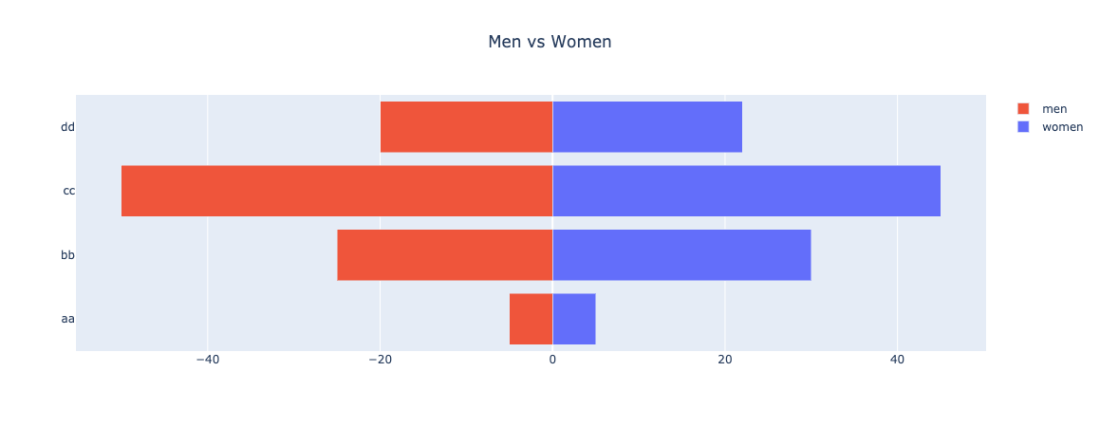
Plotly back to back horizontal bar chart

Yesterday I read Boris Gorelik post – Before and after: Alternatives to a radar chart (spider chart) and I also wanted to used this visualization but using Plotly.

So I created the following gist –

import numpy as np
import matplotlib.pyplot as plt
import plotly.graph_objects as go
women_pop = np.array([5., 30., 45., 22.])
men_pop = np.array( [5., 25., 50., 20.])
y = list(range(len(women_pop)))
fig = go.Figure(data=[
go.Bar(y=y, x=women_pop, orientation='h', name="women", base=0),
go.Bar(y=y, x=-men_pop, orientation='h', name="men", base=0)
])
fig.update_layout(
barmode='stack',
title={'text': f"Men vs Women",
'x':0.5,
'xanchor': 'center'
})
fig.update_yaxes(
ticktext=['aa', 'bb', 'cc', 'dd'],
tickvals=y
)
fig.show()